


Table of Contents
Not sure how much mobile data to buy for the FIFA World Cup 2026? This guide breaks down real data usage by activity — navigation, social media, streaming, tickets — and gives a clear GB recommendation based on your trip length and usage style.
The FIFA World Cup 2026 is the most spread-out tournament in football history. Forty-eight teams, 104 matches, 16 host cities across the USA, Mexico, and Canada. For most fans, that means travelling between cities, navigating unfamiliar transport systems, and staying connected across borders — all on a single phone plan.
That's where mobile data becomes genuinely important. Underestimate it and you're rationing every map search in a city you don't know. Overestimate it and you've overpaid for gigabytes you'll never use. We've put together this guide with real numbers — broken down by activity, trip length, and how you use your phone — so you can buy exactly the right eSIM plan for the World Cup 2026.
At a Glance
Everything you need to know about mobile data for the World Cup 2026, in one place:
- Data by activity: Exactly how much data navigation, social media, streaming, and ticketing use per day
- Traveller profiles: Three realistic daily budgets — casual fan, active social poster, and heavy user/content creator
- GB recommendations: Clear plan sizes matched to trip length and usage style
- Running out of data: How to top up with Airalo, Saily, and Holafly without buying a new eSIM
- Multi-country travel: What changes between the USA, Mexico, and Canada — and how to manage consumption in Mexico
- eSIM plan comparison: Which plan matches which data need, with approximate pricing
- 5 practical tips: Simple habits that cut data usage significantly without affecting your trip
The Short Answer
| Trip length | Usage style | Recommended data |
|---|---|---|
| Up to 7 days | Light user — messaging. maps. light social | 5–8 GB |
| Up to 7 days | Heavy user — social posting. streaming highlights | 10–15 GB |
| 10–14 days | Light user — messaging. maps. some browsing | 10 GB |
| 10–14 days | Heavy user — daily social. video. content creation | 20 GB |
| 15–38 days (full tournament) | Any style | 20 GB or unlimited |
| Content creator / livestreamer | Any trip length | Unlimited |
How Data Usage Actually Works at the World Cup
The World Cup is not a typical travel scenario. You're not sitting in a café browsing — you're navigating crowded cities, uploading in real time, running tickets and translation apps, and using your phone constantly from morning to midnight on match days.
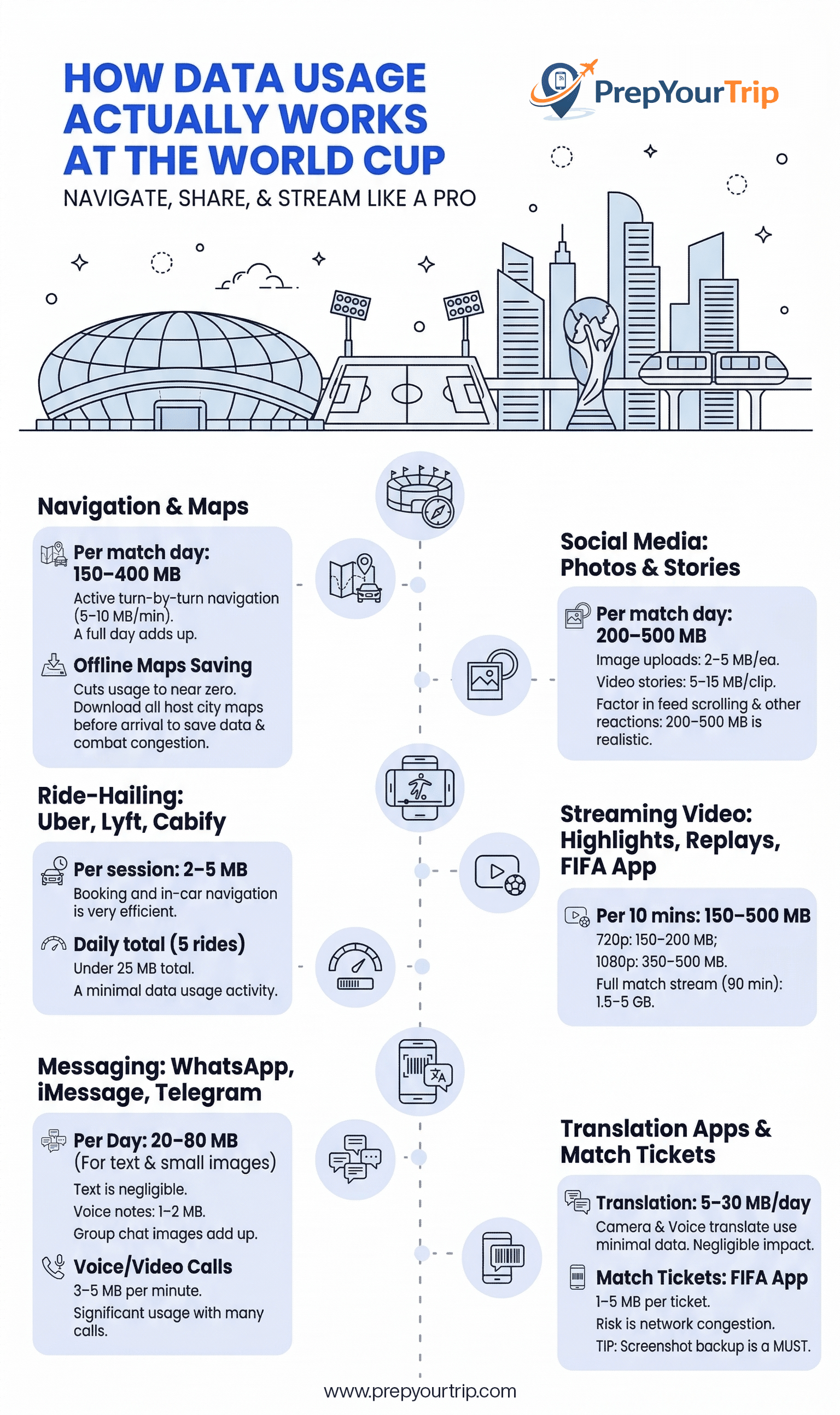
Here is a realistic per-activity breakdown:
Navigation & Maps
Per match day: 150–400 MB
Google Maps or Waze running for 30–90 minutes of active navigation uses roughly 5–10 MB per minute in turn-by-turn mode. Getting to a stadium from your hotel, finding your section, navigating post-match to a bar or transport hub — a full match day in navigation mode easily consumes 150–400 MB. Downloading offline maps for your cities before arrival cuts this to near zero, but requires Wi-Fi to download (roughly 100–300 MB per city map).
Tip: Download offline maps for every host city you'll visit before you land. It saves data and works even when stadium networks are congested.
Social Media: Photos and Stories
Per match day: 200–500 MB
Uploading a match-day photo to Instagram or a WhatsApp group uses roughly 2–5 MB per image at standard quality. Instagram Stories in video format use 5–15 MB per clip. A typical match day — 5–10 photos plus 3–5 story clips — runs 100–200 MB in uploads alone. Add in feed scrolling, loading other people's stories, and refreshing Twitter/X for match reactions: 200–500 MB per match day is realistic.
Streaming Video (Highlights, Replays, FIFA App)
Per 10 minutes: 150–500 MB depending on quality
Watching match highlights on YouTube or the FIFA+ app at 720p uses roughly 150–200 MB per 10 minutes. At 1080p, that jumps to 350–500 MB per 10 minutes. If you're streaming a 90-minute match on transit or at a café, expect 1.5–5 GB for that session alone.
For fans not watching full matches on their phones: watching 10–20 minutes of highlights and goal clips per day uses around 300–600 MB.
Messaging: WhatsApp, iMessage, Telegram
Per day: 20–80 MB (text and images)
Pure text messaging is negligible, hundreds of messages use under 5 MB. Voice notes are 1–2 MB each. Image sharing in group chats adds up: a 50-person group sharing photos from the match can generate 50–100 MB/day in received images. Voice and video calls over WhatsApp: approximately 3–5 MB per minute.
Ride-Hailing: Uber, Lyft, Cabify
Per session: 2–5 MB
Uber and Lyft apps use very little data, booking a ride and running navigation while in the car uses 2–5 MB per trip. Even booking 4–5 rides a day is under 25 MB total.
Translation Apps
Per day: 5–30 MB (Mexico and parts of Canada)
Google Translate's camera translation feature uses minimal data. Voice translation is similarly lightweight. Unless you're downloading new offline language packs (Spanish for Mexico: approximately 40–60 MB), translation is negligible in your data budget.
Match Tickets: FIFA App
One-time load: 1–5 MB per ticket
Your digital match ticket via the FIFA Official App is small, a barcode/QR code that loads in seconds. However: do not rely on loading it at the stadium turnstile on a congested network. Open the app at your hotel, let the ticket load, and screenshot it as a backup. The actual data usage is minimal; the risk is congestion preventing loading.

Covers USA, Canada, and Mexico on a single eSIM. No swapping, no reactivation when you cross a border.
Realistic Daily Data Budget by Traveler Type
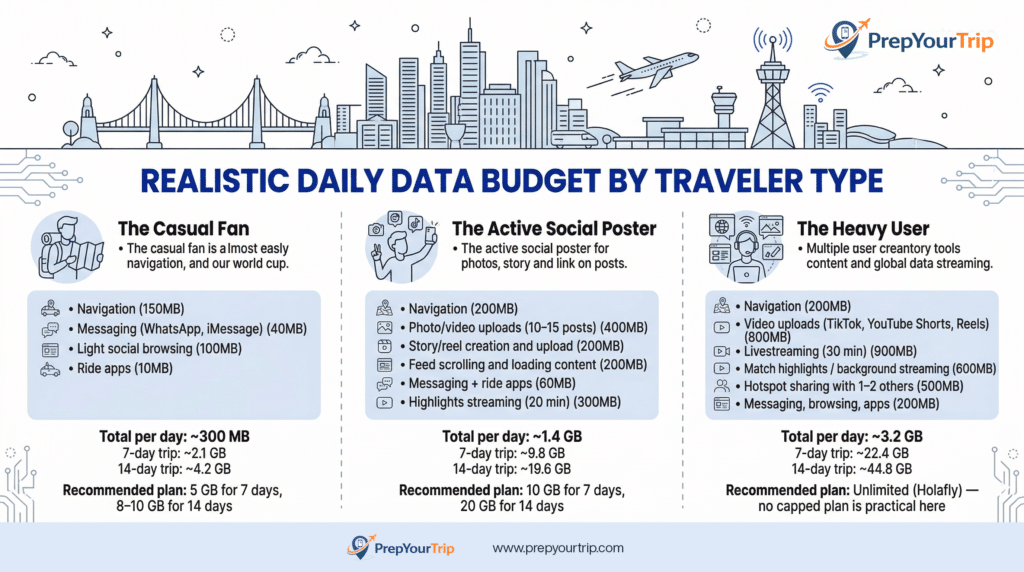
The Casual Fan (maps + messaging + light social)
Attending 1–2 matches, sightseeing between games
| Activity | Daily estimate |
|---|---|
| Navigation | 150 MB |
| Messaging (WhatsApp. iMessage) | 40 MB |
| Light social browsing | 100 MB |
| Ride apps | 10 MB |
| Total per day | ~300 MB |
7-day trip: ~2.1 GB | 14-day trip: ~4.2 GB
Recommended plan: 5 GB for 7 days, 8–10 GB for 14 days
The Active Social Poster (regular uploads, stories, reels)
Documenting the trip thoroughly for Instagram/TikTok
| Activity | Daily estimate |
|---|---|
| Navigation | 200 MB |
| Photo/video uploads (10–15 posts) | 400 MB |
| Story/reel creation and upload | 200 MB |
| Feed scrolling and loading content | 200 MB |
| Messaging + ride apps | 60 MB |
| Highlights streaming (20 min) | 300 MB |
| Total per day | ~1.4 GB |
7-day trip: ~9.8 GB | 14-day trip: ~19.6 GB
Recommended plan: 10 GB for 7 days, 20 GB for 14 days
The Heavy User (content creator, livestreamer, or group data sharer)
Creating content for audience, sharing hotspot with travel companions, streaming matches
| Activity | Daily estimate |
|---|---|
| Navigation | 200 MB |
| Video uploads (TikTok. YouTube Shorts. Reels) | 800 MB |
| Livestreaming (30 min) | 900 MB |
| Match highlights / background streaming | 600 MB |
| Hotspot sharing with 1–2 others | 500 MB |
| Messaging. browsing. apps | 200 MB |
| Total per day | ~3.2 GB |
7-day trip: ~22.4 GB | 14-day trip: ~44.8 GB
Recommended plan: Unlimited (Holafly) — no capped plan is practical here
The World Cup 2026 Data Calculator
Use this simple formula to estimate your own requirement:
Your daily estimate (GB) × Number of days = Minimum plan size
Add 25% buffer for unexpected usage
Example: Active social poster, 10-day trip
1.4 GB/day × 10 days = 14 GB + 25% buffer = ~18 GB → buy a 20 GB plan
Example: Casual fan, 7-day trip
0.3 GB/day × 7 days = 2.1 GB + 25% buffer = ~2.7 GB → a 5 GB plan is comfortable
What Happens If You Run Out of Data?
All major eSIM providers allow data top-ups without buying a new eSIM:
- Airalo: Top up via the Airalo app, additional GB added to your active plan within minutes
- Saily: In-app top-up with no plan expiry reset
- Holafly Unlimited: Cannot run out, but speed may reduce if the fair-use policy applies after very heavy usage (varies by plan)
Do not wait until you run out — top up at 80% usage so you're never left without data mid-navigation in an unfamiliar city. Set a data alert in your phone settings (iOS: Settings → Cellular → [plan name] → turn on data notifications; Android: Settings → Network → Data Usage → Set Alert).
Covers USA, Canada, and Mexico on a single eSIM. No swapping, no reactivation when you cross a border.
Multi-Country Travel: Does Data Usage Change Across Countries?
Your data consumption stays roughly constant whether you're in the USA, Mexico, or Canada — the difference is in network speed, which affects how quickly apps load rather than how much data they technically consume.
One practical difference: Mexico has more variable network quality outside central areas of Mexico City, Guadalajara, and Monterrey. Apps that auto-play high-definition content (YouTube, Instagram Reels) may pull more data on slower connections because they buffer more aggressively. If you're on a capped plan, manually set video quality to 480p in the YouTube and Netflix apps while in Mexico to control consumption.
➡ Best eSIM for World Cup 2026
Which eSIM Plans Match Each Data Need?
| Data need | Best plan | Provider | Price (approx) |
|---|---|---|---|
| Up to 5 GB. USA only | 5 GB / 30 days | Airalo or Saily | ~$13–15 |
| 10 GB. USA only or regional | 10 GB / 30 days | Saily North America | ~$22.99 |
| 15–20 GB. regional | 20 GB / 30 days | Airalo North America | ~$37 |
| Unlimited. USA-focused | Unlimited / 30 days | Holafly | ~$55–60 |
| Heavy user. all 3 countries | Unlimited (North America) | Holafly regional | Verify current pricing |
➡ Full provider details and real-time pricing: Best eSIM for World Cup 2026
5 Practical Tips to Manage Your Data at the World Cup
- Download everything offline before you leave your hotel each morning
Google Maps for the day's route, your match ticket in the FIFA app, any translation packs needed. Treat your hotel Wi-Fi as your daily prep station. - Set video quality to 480p by default
YouTube, Instagram Reels, and TikTok auto-play at the highest resolution your connection supports. Manually capping at 480p cuts streaming data consumption by 60–70% with minimal visible quality loss on a phone screen. - Use WhatsApp calls instead of your regular phone number
WhatsApp voice calls over data use approximately 3–5 MB per minute. A 10-minute call to family costs 30–50 MB. The same call using your home SIM on roaming could cost $3–10 depending on your carrier. - Pre-book your post-match transport before kick-off
Uber and Lyft both allow you to schedule pickups in advance. Booking your post-match ride before you go into the stadium means you're not fighting network congestion and surge pricing at the same time in a 80,000-person rush. - Share one hotspot among your group
If you're traveling with friends, one person with a 20 GB hotspot-enabled eSIM can serve a group of 3–4. This is far cheaper than everyone buying individual plans, and North America regional eSIMs from Airalo and Saily both enable hotspot sharing.
Frequently Asked Questions
Is 10 GB enough for the World Cup 2026?
For a 7–10 day trip as a casual to moderate user attending 2–4 matches, 10 GB is comfortable with careful management. For a 14+ day trip or active social media use, 20 GB or unlimited is a safer choice.
How much data does Google Maps use per hour?
Google Maps in active navigation mode uses approximately 5–10 MB per minute, or 300–600 MB per hour. Downloading offline maps for a city beforehand reduces this to near zero for map display, though live traffic updates still use a small amount of data.
Should I get unlimited data or a capped plan?
If you're attending 5+ matches, posting daily to social media, or sharing your hotspot with travel companions, unlimited (Holafly) is worth the extra $15–20 over a 20 GB capped plan for the peace of mind alone. If you're a light user attending 2–3 matches on a 7-day trip, 10 GB is more than enough.
Does streaming match highlights use a lot of data?
Yes, more than most travellers expect. Ten minutes of YouTube highlights at 720p uses roughly 150–200 MB. A 45-minute extended highlights package at 1080p can use 1.5–2.5 GB. Set streaming apps to 480p to reduce consumption significantly without meaningful quality loss on a mobile screen.
Will I use more data in Mexico than in the USA?
Your consumption target is the same, but slower networks in some areas of Mexico may cause apps to buffer more aggressively. Manually set video quality limits when using capped plans in Mexico as a precaution.
What's the cheapest way to stay connected across all three host countries?
A regional North America eSIM covers the USA, Mexico, and Canada on one plan, no swapping, no separate purchases. Airalo and Saily both offer regional plans from around $22–37 for 10–20 GB. For heavy users, Holafly's unlimited regional plan is the most cost-effective option if you're attending multiple matches across different countries.
Can I share my eSIM data as a hotspot?
Most eSIM plans from Airalo and Saily support hotspot sharing, but always check the plan details before purchasing, some plans restrict tethering. Holafly's unlimited plans generally support hotspot use, though very heavy shared usage may trigger fair-use speed reductions.
Final Thoughts
Mobile data is one of those World Cup logistics details that's easy to get wrong in both directions. Most fans either assume their home plan will work out fine (it won't, at a reasonable cost) or buy a random plan without checking whether it covers all three host countries. A bit of planning here saves money and frustration.
The key numbers to remember: casual fans need 5–10 GB for a typical week-long trip; active social media users need 15–20 GB; content creators and hotspot sharers should go straight to unlimited. Add 25% buffer to whatever your daily estimate is, and top up at 80% rather than waiting until you run dry.
- Best eSIM for World Cup 2026 → Full provider comparison
- How to stay connected at the World Cup → Setup guide, roaming avoidance, and carrier comparison
- Best apps for the World Cup 2026 → FIFA app, navigation, translation tools
- World Cup 2026 Travel Guide → Complete travel guide for World Cup 2026
Add your first comment to this post