


Table of Contents
The FIFA World Cup 2026 spans three countries, 16 cities, and 38 days. For most international fans, that means crossing borders, switching time zones, and navigating unfamiliar transit systems — all while staying reachable. The last thing you want is to discover halfway through the tournament that your phone has been racking up roaming charges you never agreed to.
That's more common than you'd think. Carrier day passes, per-megabyte data rates, and plans that look international but don't cover all three host countries have caught out plenty of travellers before. The good news is that staying connected at the World Cup 2026 is genuinely simple — and inexpensive — if you set things up correctly before you fly.
This guide covers every connectivity option for the World Cup 2026: eSIMs, local SIMs, carrier plans, and Wi-Fi. We explain what each costs honestly, where each falls short, and which option we recommend based on your trip type. Set this up before you depart, and you'll have fast data in the USA, Canada, and Mexico without a surprise bill waiting at home.

At a Glance
Here is what this guide covers:
- Why connectivity at the World Cup 2026 is more complex than usual: Three countries, 16 cities, and stadium congestion all affect which solution works best.
- eSIM with a North America regional plan: The recommended option for most fans — one plan covering all three countries, installed in minutes, no roaming risk.
- Your home carrier's international plan: Can be good value if your plan already includes North America — but check the small print before you assume.
- Local physical SIM: Works well for single-country travel or older phones without eSIM support, but inconvenient for multi-country fans.
- Pocket Wi-Fi and Wi-Fi only: Both have real limitations for World Cup travel — useful to understand why.
- Step-by-step setup guide: Exactly how to install your eSIM, disable roaming, and download offline essentials before you land.
- Stadium connectivity: What to expect inside venues, and how to prepare so congestion doesn't catch you off guard.
Why World Cup 2026 Connectivity Is Uniquely Complicated
Most international travel involves one country, one network, one SIM. The World Cup 2026 breaks that model in three ways:
1. Three-country travel. The 16 host cities spread across the USA (11 cities), Mexico (3 cities), and Canada (2 cities). Fans following a team through group stages, knockouts, and finals can easily move between all three countries within the tournament's 38-day window.
2. Multi-city domestic travel. Even fans staying in the US visit multiple cities — New York for the group stage, Miami for the round of 16, Dallas for the quarterfinals. Domestic US travel on roaming still triggers international charges for non-US number holders.
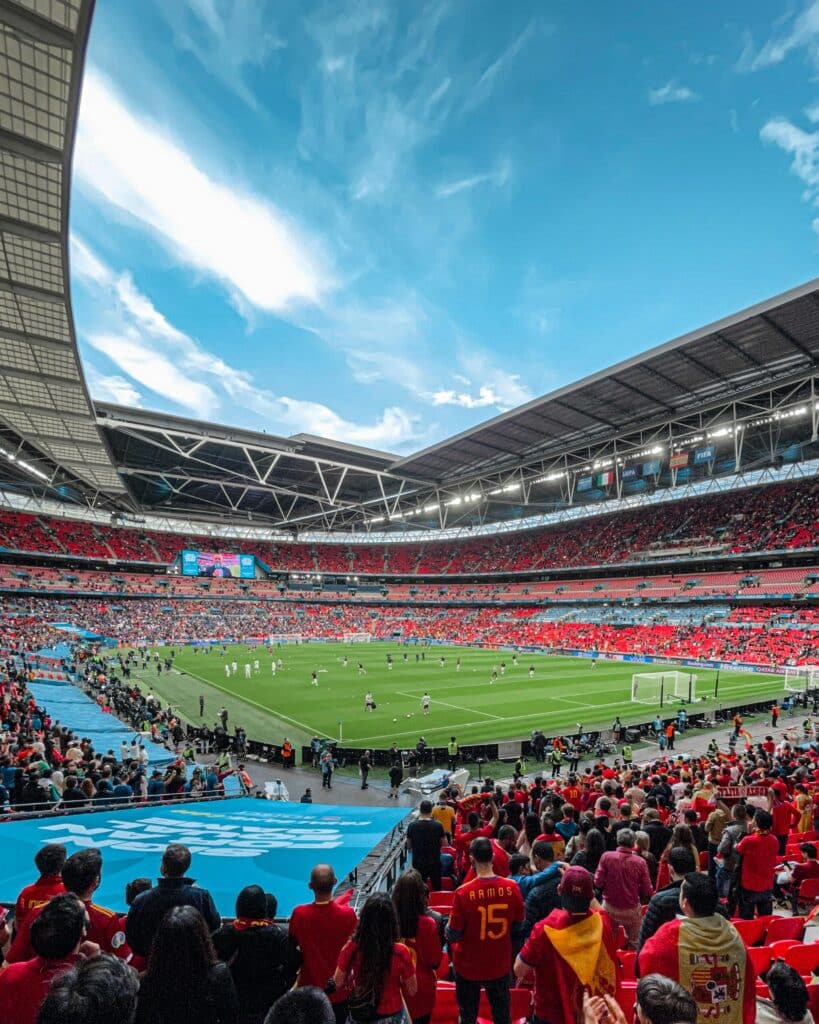
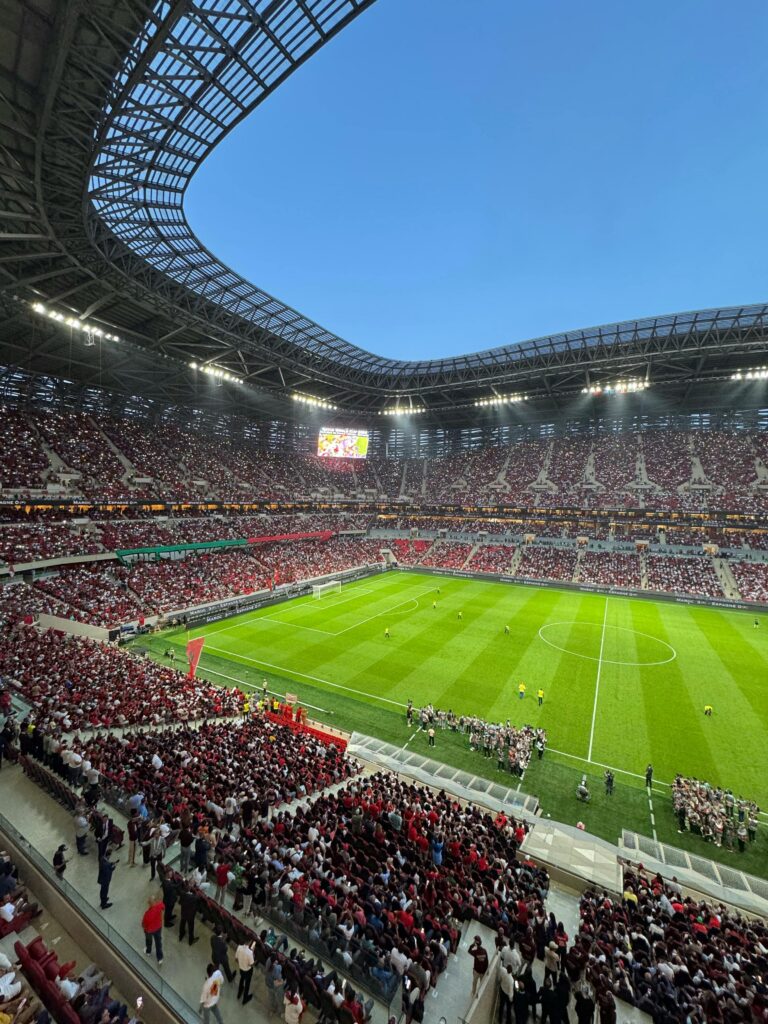
3. Stadium network congestion. MetLife Stadium holds 82,500 fans. Estadio Azteca holds 83,000. When that many people try to upload a goal celebration video simultaneously, networks slow significantly. Connectivity that works fine in your hotel may struggle inside the venue.
These three factors mean your connectivity solution needs to be: multi-country capable, high enough data to handle days of heavy use, and on a network with enough capacity to manage stadium loads.

All Your Connectivity Options — Ranked by Value
Option 1: eSIM with a North America Regional Plan ✅ Recommended
An eSIM is a digital SIM installed on your phone without a physical card. A North America regional eSIM covers the USA, Canada, and Mexico simultaneously — you cross a border and the plan continues working without any action required.
Cost: $22–60 for 30 days of data depending on provider and data amount
Coverage: All three host countries
Setup: QR code scan, takes 3 minutes at home before departure
Roaming risk: Zero — this is a prepaid local data plan, not roaming
The best North America regional eSIM plans for World Cup 2026:
- Airalo North America — 10 GB ($23) or 20 GB ($23) or 20 GB ($37), T-Mobile/Rogers infrastructure
- Saily North America — 10 GB ($22.99), competitive pricing, hotspot enabled
- Holafly — Unlimited data options ($45–60/30 days), best for heavy users
- ByteSIM North America — AT&T + Rogers priority access, best for stadium performance
A North America regional eSIM installed before departure gives you full-speed local coverage from the moment you land — no queuing at airport counters, no roaming charges accumulating in the background.
➡ Full provider comparison: Best eSIM for World Cup 2026
Option 2: Your Home Carrier's International Plan ⚠️ Situational
Some home carriers offer international plans that are genuinely good value — particularly if your plan already includes North America roaming.
When this actually works:
- Rogers (Canada-based): Rogers Infinite plans include USA and Mexico roaming as standard. Canadian fans attending matches in the USA or Mexico may not need a separate eSIM at all
- T-Mobile (US-based): T-Mobile's Magenta plans include Canada and Mexico data . US-based fans visiting Canadian or Mexican venues may be covered
- AT&T (US-based): Roam North America feature on eligible unlimited plans covers Mexico and Canada with no daily fee
When to avoid:
- If your carrier charges a day pass fee ($10-12 per day) which for 30 days would cost around $300-360, vastly more expensive than a $25 eSIM
- If you're from outside North America. European, Asian, South American, and African carriers typically charge high per-day roaming rates for North America
Check your carrier's specific international policy for the USA, Mexico, and Canada before assuming you're covered. The difference between “included” and “subject to a daily fee” is $200–400 over the tournament.
Option 3: Local Physical SIM ⚠️ Inconvenient for Multi-Country Fans
Buying a local SIM at each destination, a US SIM, then a Mexican SIM, then a Canadian SIM, guarantees local rates but creates logistical friction.
Cost per SIM:
- US prepaid SIM (AT&T/T-Mobile/Mint): $15–30 for 15–30 days, 10–15 GB
- Mexico prepaid SIM (Telcel): $10–20 for 30 days, 10–20 GB
- Canada prepaid SIM (Freedom Mobile/Fido): $15–30 for 30 days
Problems:
- Requires 3 separate purchases, potentially at airport stores with limited stock and premium pricing during the tournament rush
- Requires 3 separate activations, often requiring local ID or documentation
- You lose your existing number for calls and texts while using each local SIM
- Physical SIM swaps at borders are inconvenient and create gaps in connectivity
When it makes sense: Fans attending only one country's matches with an older phone that doesn't support eSIM.
Option 4: Pocket Wi-Fi Device ❌ Not Recommended for This Tournament
Portable Wi-Fi devices (MiFi/pocket hotspots) provide a shared mobile hotspot for a group. They work but have significant drawbacks for World Cup travel:
- Battery life: Most pocket Wi-Fi devices last 8–10 hours, barely enough for a match day with travel
- Rental cost: $7–15/day to rent, plus equipment deposit, often more expensive than eSIM over the tournament duration
- Stadium performance: Same congestion issues as any mobile data, no special advantage
- Lost/stolen risk: An additional physical device to carry and protect
A group of fans is better served by one person with a hotspot-enabled eSIM than a dedicated pocket Wi-Fi device.
Option 5: Wi-Fi Only ❌ Not Viable as a Primary Strategy
Relying on hotel Wi-Fi and venue hotspots as your primary connectivity approach will fail at the World Cup for a simple reason: you need data most when you are furthest from Wi-Fi.
- Stadium navigation, crowd navigation, and ride-share booking all happen outdoors
- Stadium venues and fan zones have extremely congested free Wi-Fi when available at all
- Download offline maps, match tickets, and key documents, but do not rely on Wi-Fi as your only connection
Wi-Fi is a supplement to your data plan, not a replacement.
What Your Phone Bill Looks Like: With vs. Without an eSIM
| Scenario | Countries covered | Cost |
|---|---|---|
| Verizon Day Pass ($10/day × 30 days) | USA only | $300 |
| AT.T Day Pass + separate Mexico/Canada fees | 3 countries | $350–420 |
| Roaming without any plan (per-MB rates) | Any country | $500–1.000+ |
| Airalo North America 20 GB eSIM | USA + Canada + Mexico | $37 |
| Holafly Unlimited 30-day eSIM | USA (+ regional) | $55–60 |
The saving is not marginal — a $37 regional eSIM versus a $350-420 carrier day-pass bill is a $300+ difference that pays for two or three match tickets. Staying connected during the World Cup 2026 should cost less than a stadium meal, not more than a flight upgrade.

Covers USA, Canada, and Mexico on a single eSIM. No swapping, no reactivation when you cross a border.
Step-by-Step: Setting Up Zero-Roaming Connectivity Before You Travel
Step 1: Check your phone's eSIM compatibility
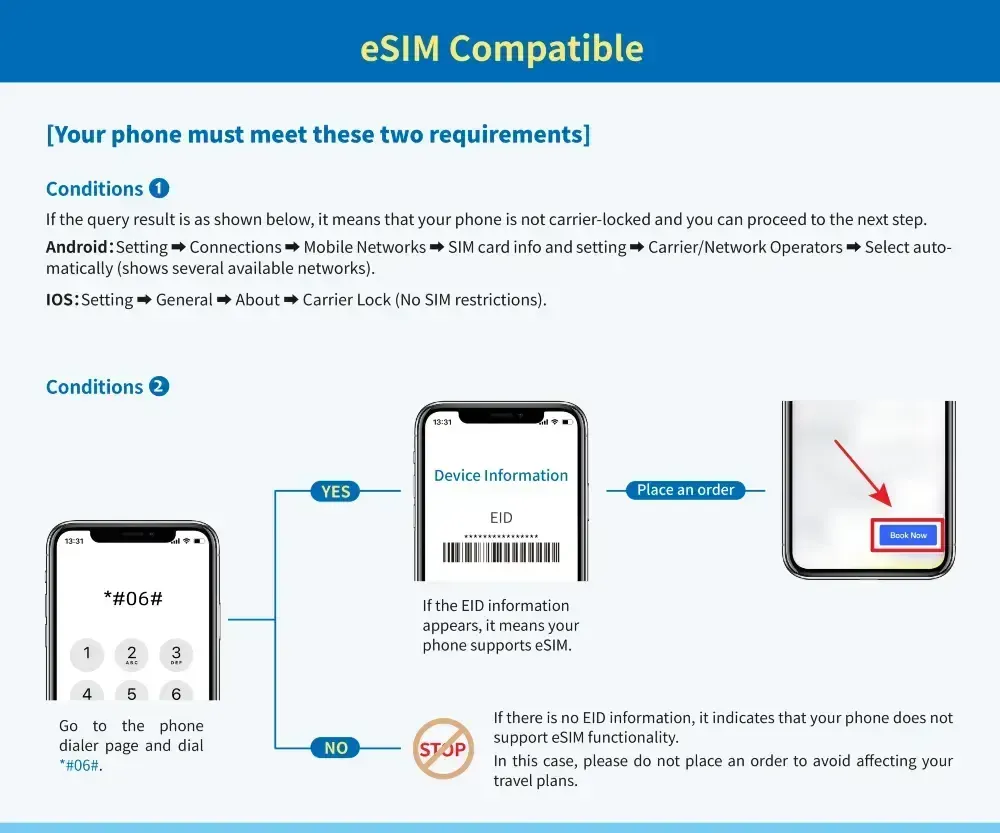
iPhones from iPhone XS (2018) and later support eSIM. Samsung Galaxy from S20, Google Pixel from Pixel 3 — most modern flagship phones are compatible. Check: Settings → General → About → Available SIMs (iOS) or Settings → Connections → SIM Manager (Android).
Step 2: Check your device is unlocked
Your phone must be network-unlocked to install a third-party eSIM. Check with your carrier or verify in Settings. Unlocked devices can use any eSIM; carrier-locked devices cannot.
Step 3: Choose your plan based on trip type
| Trip type | Recommended option |
|---|---|
| Visiting all 3 countries | Airalo or Saily North America regional (20 GB) |
| USA-only. heavy user | Holafly Unlimited (30 days) |
| USA-only. budget | Saily 10 GB USA ($22.99) |
| Canadian fan (Rogers Infinite) | Check if your plan covers USA/Mexico — may already be included |
| US fan (T-Mobile Magenta) | Check if Canada/Mexico is included in your plan |
Step 4: Buy and install your eSIM at home — before departure
Purchase your chosen eSIM online → receive QR code by email → Settings → Add eSIM → scan code. The plan installs immediately. Do not activate until you land — activation starts the validity period.
Step 5: Set your eSIM as the primary data line
After installation, go to Settings → Cellular → set the eSIM as your default data line. Keep your home SIM active for calls and texts but with data roaming disabled.
Step 6: Disable roaming on your home SIM
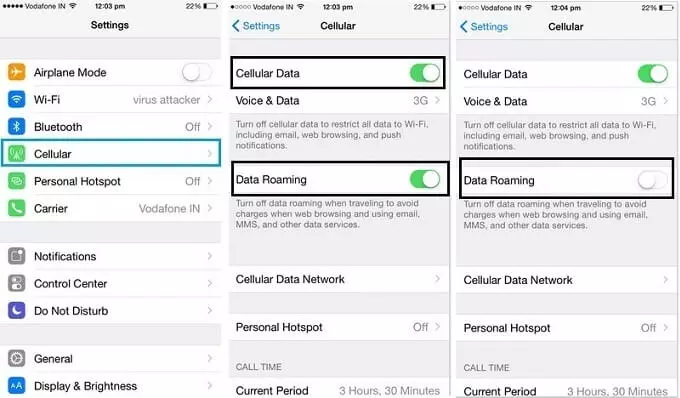
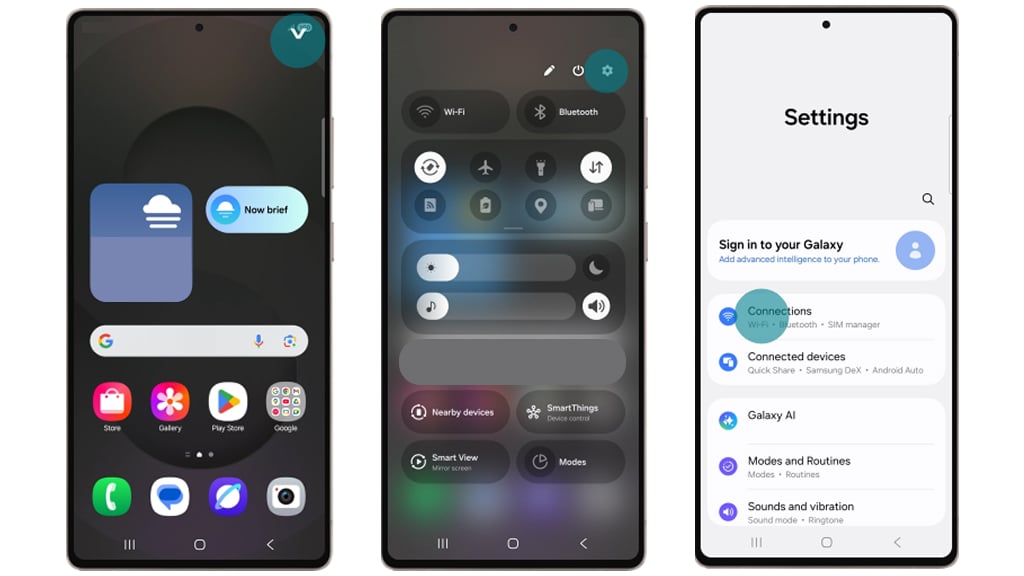
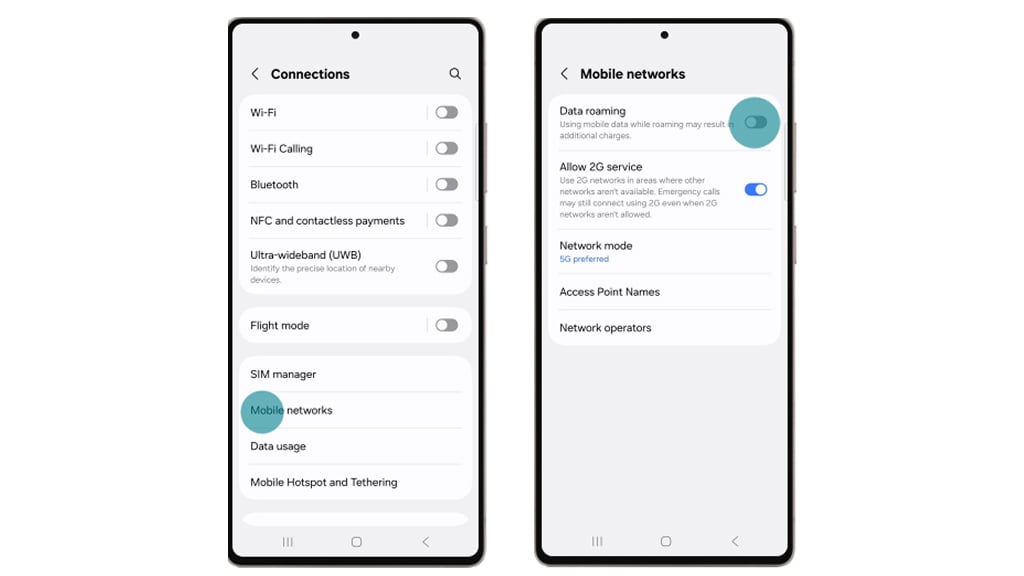
This is the critical step most travellers miss. Even with an active eSIM, your home SIM will attempt to roam if you don't disable it.
On iOS: Settings → Cellular → [your home SIM] → Data Roaming → Off.
On Android: Settings → Connections → Mobile Networks → Data Roaming → Off.
Step 7: Download offline essentials before you land
With your eSIM installed and home SIM roaming disabled, download these while on home Wi-Fi:
- Google Maps offline for all host cities you'll visit
- FIFA Official App (match tickets, schedules)
- Uber/Lyft app with payment method saved
- WhatsApp (for free calling over data)
- Translation app with offline language packs (Spanish for Mexico)
A multi-country World Cup trip is also worth protecting with travel insurance — delays, cancellations, and medical costs across three countries add up fast if something goes wrong.
➡ Get your EKTA travel insurance here.
Stadium Connectivity: What to Expect Inside the Venues
Even with the right eSIM, stadium connectivity during matches is congested. Here's what actually works:
Before kick-off (outside stadium): Normal speeds — upload photos, check maps, message friends freely.
During the match (inside): Expect slow uploads. Images typically still send; video uploads may queue or fail. The FIFA Official App stores your digital ticket — download it and cache your ticket before you enter. Do not rely on loading it at the turnstile.
Immediately after the final whistle: The worst congestion point. 80,000+ people trying to call, post, and book rides simultaneously. Download your offline maps and pre-book your post-match transport before kick-off.
Practical tip: Screenshot your match ticket, hotel address, and return transport plan before the match starts. Treat the last 5 minutes of the game as your offline preparation window.
If you're still sorting out your data plan before the tournament, this is the place to do it — the right setup for staying connected at the World Cup 2026 takes five minutes at home and saves a lot of stress at the turnstile.
Covers USA, Canada, and Mexico on a single eSIM. No swapping, no reactivation when you cross a border.

Frequently Asked Questions
Will my phone work in the USA, Canada, and Mexico without a special plan?
Your phone will find a network, but without a roaming plan or local eSIM, data charges will apply at your carrier's per-use rates, which can be $2.05 per MB or more. This can generate a multi-hundred-dollar bill from normal usage. Always set up a data plan before you use your phone internationally.
Can I use WhatsApp and iMessage without paying roaming fees?
Yes, if you're connected to Wi-Fi or a local data plan (eSIM or local SIM). WhatsApp and iMessage use data, not your SMS plan. With a $25 eSIM providing 10 GB of data, all messaging and calls through WhatsApp are included at no additional cost.
Do I need a different eSIM for each country?
Not if you buy a North America regional plan. Airalo, Saily, and ByteSIM all offer single plans covering USA, Canada, and Mexico simultaneously. You cross a border and the plan continues working, no action required.
What happens if I run out of data?
All major eSIM providers allow in-app top-ups. Airalo and Saily both let you buy additional data through their apps. If you chose an unlimited plan (Holafly), you won't run out. Set a data usage alert in your phone settings at 80% of your plan allowance so you know to top up before you hit the limit.
Is stadium Wi-Fi reliable enough to use instead of mobile data?
No. Stadium Wi-Fi at large venues is heavily congested during matches. It may work for basic tasks before the match, but do not rely on it for match ticket access, navigation, or post-match transport booking. A mobile data plan is essential.
How much data will I actually use at the World Cup?
A typical match day — navigation, messaging, social media, maps, and a few photo uploads — uses roughly 1–2 GB. Over a 30-day trip with frequent match days and travel between cities, 10–15 GB is a reasonable estimate for moderate users. Heavy users (video calls, streaming highlights, frequent uploads) should consider an unlimited plan.
Can I use my eSIM as a hotspot to share data with travel companions?
Most North America regional eSIM plans from Saily, Airalo, and ByteSIM include hotspot functionality. Holafly's unlimited plans may have restrictions on hotspot use — check the plan details before purchasing if you plan to share your connection.
Final Thoughts
Staying connected at the World Cup 2026 does not need to be complicated or expensive. A North America regional eSIM from Airalo, Saily, or Holafly covers all three host countries on a single plan, costs a fraction of what your home carrier would charge, and takes less than five minutes to install. The only real risk is not setting it up before you fly.
The steps that matter most: install your eSIM at home before departure, disable data roaming on your home SIM, and download your offline maps and match tickets while you still have Wi-Fi. Do those three things and you'll have reliable data across the entire tournament — without a bill waiting for you when you land back home.
If you're still deciding which plan to go with, our full provider comparison breaks down pricing, data allowances, and network quality across the top options for each host country.
- Best eSIM for World Cup 2026 → Full provider comparison with pricing table
- How much data do you need at the World Cup? → Per-day data usage breakdown
- Best apps for the World Cup 2026 → FIFA app, navigation, translation, and more
- World Cup 2026 Travel Guide → Full pillar: visa, transport, accommodation, packing
- Best eSIM for USA → US-specific network and plan details
- Best eSIM for Mexico → Mexico City, Guadalajara, Monterrey coverage
Add your first comment to this post